What’s New?
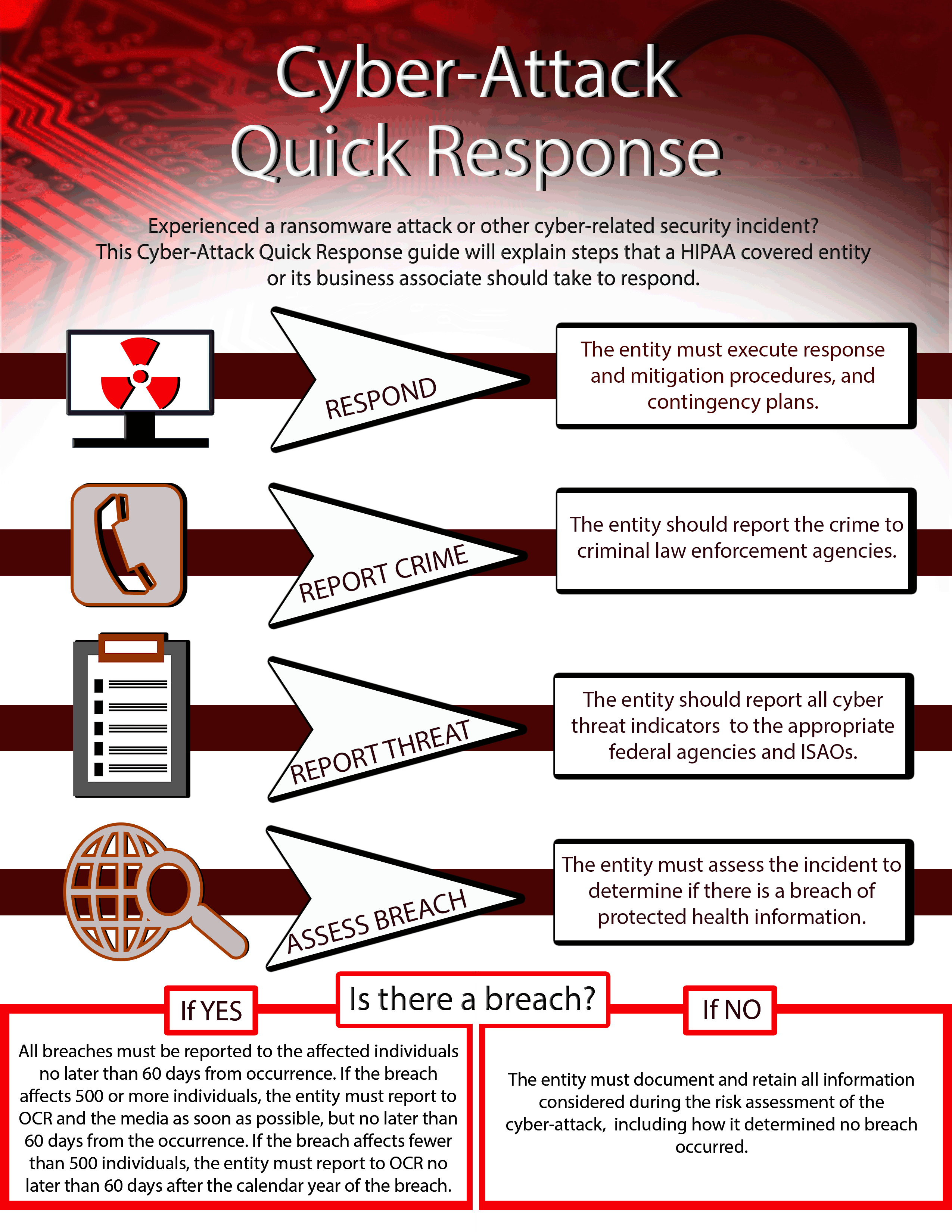
Health and Human Services, Office for Civil Rights (HHS OCR) released a cybersecurity checklist and infographic in response to the WannaCry ransomware attacks in 2017.
HHS OCR provides a breakdown of the steps covered entities, business associates and subcontractors must do to properly respond to a ransomware attack or cyber-related security incident that compromises PHI. They are providing a checklist and infographic as part of the campaign to raise awareness and improve readiness by entities when dealing with cyber-attacks.
What do we do now?
- Respond – Execute contingency plans and response and mitigation plans which are part of your disaster recovery plan. (HIPAA compliance will prepare your organization)
- Report the Crime – Report the crime to law enforcement agencies. This could include local or state law enforcement, FBI, and/or the Secret Service.
- Report Threats – Report all cyber threat indicators to the appropriate federal agencies and information-sharing and analysis organizations; this would be the Department of Homeland Security and HHS Assistant Secretary for Preparedness and Response.
- Assess Attack to Determine if there is a Breach – Evaluate the incident to determine whether there is a breach of electronic Protected Health Information (ePHI).
- If yes, report to the affected individuals within 60 days from the breach incident. In the event that the breach affects more than 500 individuals, report to HHS OCR and the media within 60 days of the occurrence (preferably as soon as possible). And if the breach affects less than 500 individuals, your organization must report to HHS OCR no later than 60 days after the end of the calendar year.
- If no, your organization must document and retain all information considered during the risk analysis of the cyber-attack. This includes how you determined the incident was not considered a breach.
Make sure you and your team understand this infographic
This describes what to do once your organization has experienced a cyber-attack. The smart step is to prepare for a ransomware attack or cyber-related security incident. Daily backups of your data are the key step in preparing against attacks. Remember not to assume your organization is too small. Hackers target small companies because they are less likely to be prepared, can’t afford interruptions in their business, and are willing to pay the ransom demanded in order to make the problem go away.
Total HIPAA specializes in HIPAA compliance services, helping businesses adhere to HIPAA guidelines and protect sensitive data. Our experts ensure your organization remains compliant with HIPAA regulations, meaning you can focus on your core operations while we handle documenting the policies and procedures that make up your HIPAA compliance plan. Trust Total HIPAA for comprehensive compliance solutions tailored to your needs. Book a clarity call today.
HIPAA Talk
Most people know the HIPAA Law applies to healthcare providers (hospitals, doctors, dentists, ophthalmologists). Fewer people realize that HIPAA also applies to health insurance agents, employers who offer health benefits to their employees, and to business associates (shredding companies, IT vendors, etc.) who can access an individual’s Protected Health Information.
What Happens if an Agency is Responsible for a Breach?
In the latest episode of HIPAA Talk, Jason Karn, Total HIPAA’s chief compliance officer interviews David C. Smith, nationally recognized HIPAA consultant to discuss what the recommended steps are to properly handle a breach of information by your agency.

RELATED CONTENT
Watch the 2023 Webinar: HIPAA Violations in the Real World
Case Study- Hook, Line, and Sinker: Falling for a Phishing Scam